---
title: Quick Pay
description: In this article, learn how to utilize the Quick Pay option from the calendar.
---
[Skip to content](https://dbathubhelp.upperhand.com/quick-pay#main-content)
English
Show submenu for translations
[Submit a ticket](https://dbathubhelp.upperhand.com/kb-tickets/new?hsLang=en)

Open main navigation
Close main navigation
- English
Show submenu for translations
- [Submit a ticket](https://dbathubhelp.upperhand.com/kb-tickets/new)
- [Go to dbat.com](https://dbat.com/)
[Go to dbat.com](https://dbat.com/)
How can we help you?
- There are no suggestions because the search field is empty.
1. [D-BAT Hub Help Center](https://dbathubhelp.upperhand.com/?hsLang=en)
2. [Payments](https://dbathubhelp.upperhand.com/payments?hsLang=en)
# Quick Pay
## In this article, learn how to utilize the Quick Pay option from the calendar.
APPLIES TO: Admins and Staff
Last updated: June 21, 2023
**Quick Links**
[Using Quick Pay to make a payment or add a retail item](https://dbathubhelp.upperhand.com/quick-pay#quick-pay)
[Using Quick Pay to waive a balance](https://dbathubhelp.upperhand.com/quick-pay#using-quick-pay-to-waive-a-balance)
#### Quick Pay - Video Walkthrough
#### In-App Walkthrough
Step 1:
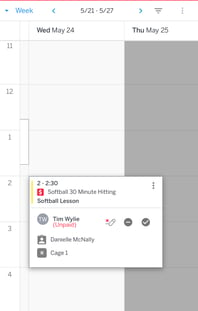 Step 2:
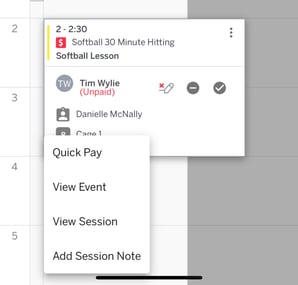Step 3:
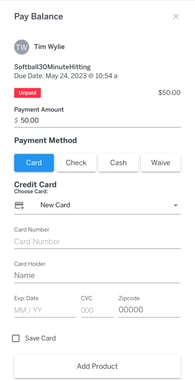
#### Quick Pay - Step By Step Guide
#### Using Quick Pay to Waive a Balance
#### Things to Note:
- When using the “add product” feature in Quick Pay, the option to use the PAX device at checkout will be disabled so you will either need to use a stored card on file or add a new card or cash/check as the payment method.
- You are able to add multiple quantities of one retail item but you can only add one product
- You can pay a partial balance for the lesson but you can't pay a partial balance for the retail item
- The retail item will show as a separate order in the reports
- If you waive a partial balance and close out of the quick pay modal, you will need to navigate to the client profile to pay down the remaining balance.
- [Getting Started](https://dbathubhelp.upperhand.com/getting-started?hsLang=en)
- [Feature & Bug Updates](https://dbathubhelp.upperhand.com/feature-bug-updates?hsLang=en)
- [Account Setup](https://dbathubhelp.upperhand.com/account-setup?hsLang=en#main-content)
- [Account Settings](https://dbathubhelp.upperhand.com/account-setup?hsLang=en#account-settings)
- [Help & Resources](https://dbathubhelp.upperhand.com/account-setup?hsLang=en#help-resources)
- [Events](https://dbathubhelp.upperhand.com/events?hsLang=en#main-content)
- [Event Setup](https://dbathubhelp.upperhand.com/events?hsLang=en#event-setup)
- [Event Admin View](https://dbathubhelp.upperhand.com/events?hsLang=en#event-admin-view)
- [Browse Events](https://dbathubhelp.upperhand.com/events?hsLang=en#browse-events)
- [Calendar](https://dbathubhelp.upperhand.com/calendar?hsLang=en)
- [Contacts](https://dbathubhelp.upperhand.com/contacts?hsLang=en#main-content)
- [Archived](https://dbathubhelp.upperhand.com/contacts?hsLang=en#archived)
- [Clients](https://dbathubhelp.upperhand.com/contacts?hsLang=en#clients)
- [Groups](https://dbathubhelp.upperhand.com/contacts?hsLang=en#groups)
- [Staff](https://dbathubhelp.upperhand.com/contacts?hsLang=en#staff)
- [Marketing](https://dbathubhelp.upperhand.com/marketing?hsLang=en)
- [Reports](https://dbathubhelp.upperhand.com/reports?hsLang=en)
- [Memberships](https://dbathubhelp.upperhand.com/memberships?hsLang=en)
- [Resources](https://dbathubhelp.upperhand.com/resources?hsLang=en)
- [Retail](https://dbathubhelp.upperhand.com/retail?hsLang=en)
- [Settings](https://dbathubhelp.upperhand.com/settings?hsLang=en#main-content)
- [Printer](https://dbathubhelp.upperhand.com/settings?hsLang=en#printer)
- [Point of Sale (POS)](https://dbathubhelp.upperhand.com/point-of-sale-pos?hsLang=en)
- [Batting Cage Credits](https://dbathubhelp.upperhand.com/batting-cage-credits?hsLang=en#main-content)
- [Embed Integration (Swing Card)](https://dbathubhelp.upperhand.com/batting-cage-credits?hsLang=en#embed-integration-swing-card)
- [Home Plate Pass (QR Code)](https://dbathubhelp.upperhand.com/batting-cage-credits?hsLang=en#home-plate-pass-qr-code)
- [Payments](https://dbathubhelp.upperhand.com/payments?hsLang=en#main-content)
- [Paysafe/NETBANX](https://dbathubhelp.upperhand.com/payments?hsLang=en#paysafe-netbanx)
- [Hardware](https://dbathubhelp.upperhand.com/hardware?hsLang=en)
- [Client Side](https://dbathubhelp.upperhand.com/client-side?hsLang=en#main-content)
- [Top Searched Articles](https://dbathubhelp.upperhand.com/client-side?hsLang=en#top-searched-articles)
- [Account Management](https://dbathubhelp.upperhand.com/client-side?hsLang=en#account-management)
- [Event Sign Up](https://dbathubhelp.upperhand.com/client-side?hsLang=en#event-sign-up)
- [Scheduling](https://dbathubhelp.upperhand.com/client-side?hsLang=en#scheduling)
- [Payments](https://dbathubhelp.upperhand.com/client-side?hsLang=en#payments)
- [Memberships](https://dbathubhelp.upperhand.com/client-side?hsLang=en#memberships)
- [AI Intelligence](https://dbathubhelp.upperhand.com/ai-intelligence?hsLang=en)
- [D-BAT WebKIT](https://dbathubhelp.upperhand.com/d-bat-webkit?hsLang=en)
[](https://upperhand.com)
Email Hours: M-F 9am - 2am EST
Chat Hours: M-F 9am - 5pm EST
Copyright © 2026, Upper Hand
```json
{
"@context" : "https://schema.org",
"@type" : "VideoObject",
"caption" : {
"@type" : "MediaObject",
"contentUrl" : "https://dbathubhelp.upperhand.com/media-transcripts/114246508145/en.vtt",
"inLanguage" : "en",
"name" : "en Captions"
},
"contentUrl" : "https://22168009.fs1.hubspotusercontent-na1.net/hubfs/22168009/2023-05-04_10-39-08.mp4",
"dateModified" : "2026-09-14T14:52:00.527Z",
"duration" : "PT1M40.997S",
"height" : 696,
"name" : "2023-05-04_10-39-08",
"thumbnailUrl" : "https://file.upperhand.com/hubfs/2023-05-04_10-39-08.mp4/medium.jpg",
"uploadDate" : "2023-05-04T14:42:05.726Z",
"width" : 1440
}
```
```json
{
"@context" : "https://schema.org",
"@type" : "VideoObject",
"caption" : {
"@type" : "MediaObject",
"contentUrl" : "https://dbathubhelp.upperhand.com/media-transcripts/119851207588/en.vtt",
"inLanguage" : "en",
"name" : "en Captions"
},
"contentUrl" : "https://22168009.fs1.hubspotusercontent-na1.net/hubfs/22168009/Education/D-BAT%20Hub%20Knowledge%20Base%20Videos/D-BAT%20Quick%20Pay%20Waive.mp4",
"dateModified" : "2026-09-14T14:57:39.299Z",
"duration" : "PT1M1.825S",
"height" : 698,
"name" : "D-BAT Quick Pay Waive",
"thumbnailUrl" : "https://file.upperhand.com/hubfs/Education/D-BAT%20Hub%20Knowledge%20Base%20Videos/D-BAT%20Quick%20Pay%20Waive.mp4/medium.jpg",
"uploadDate" : "2023-06-12T15:37:38.085Z",
"width" : 1402
}
```